













PostgreSQL字符串函數(shù)
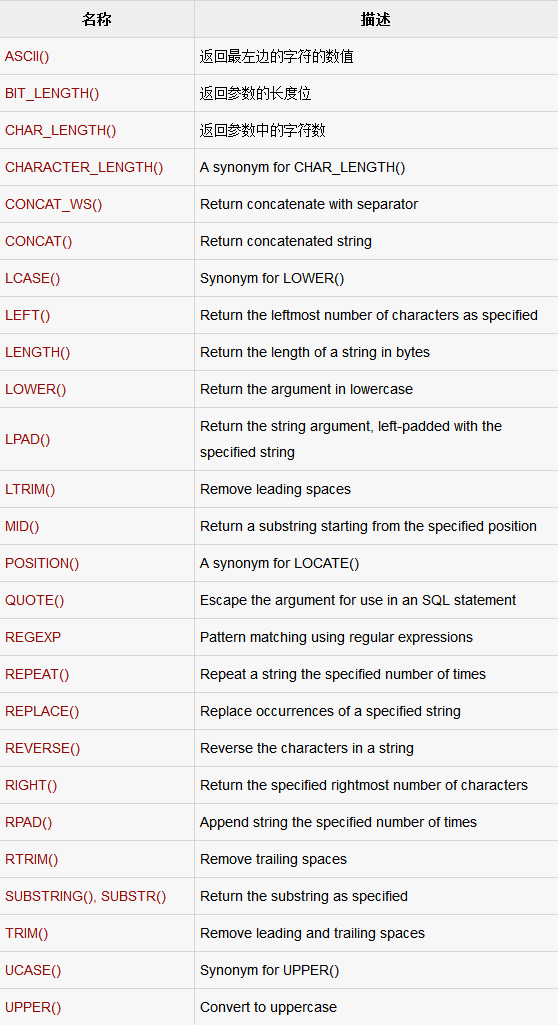
PostgreSQL的字符串函數(shù)主要用于字符串操作。下表詳細(xì)介紹了重要的字符串函數(shù):
ASCII(str)
Returns the numeric value of the leftmost character of the string str. Returns 0 if str is the empty string. Returns NULL if str is NULL. ASCII() works for characters with numeric values from 0 to 255.
- testdb=# SELECT ASCII('2');
- +---------------------------------------------------------+
- | ASCII('2') |
- +---------------------------------------------------------+
- | 50 |
- +---------------------------------------------------------+
- 1 row in set (0.00 sec)
- testdb=# SELECT ASCII('dx');
- +---------------------------------------------------------+
- | ASCII('dx') |
- +---------------------------------------------------------+
- | 100 |
- +---------------------------------------------------------+
- 1 row in set (0.00 sec)
BIT_LENGTH(str)
返回位字符串str的長度。
- testdb=# SELECT BIT_LENGTH('text');
- +---------------------------------------------------------+
- | BIT_LENGTH('text') |
- +---------------------------------------------------------+
- | 32 |
- +---------------------------------------------------------+
- 1 row in set (0.00 sec)
CHAR_LENGTH(str)
Returns the length of the string str, measured in characters. A multi-byte character counts as a single character. This means that for a string containing five two-byte characters, LENGTH() returns 10, whereas CHAR_LENGTH() returns 5。
- testdb=# SELECT CHAR_LENGTH('text');
- +---------------------------------------------------------+
- | CHAR_LENGTH('text') |
- +---------------------------------------------------------+
- | 4 |
- +---------------------------------------------------------+
- 1 row in set (0.00 sec)
CHARACTER_LENGTH(str)
CHARACTER_LENGTH() is a synonym for CHAR_LENGTH()。
CONCAT(str1,str2,...)
Returns the string that results from concatenating the arguments. May have one or more arguments. If all arguments are non-binary strings, the result is a non-binary string. If the arguments include any binary strings, the result is a binary string. A numeric argument is converted to its equivalent binary string form; if you want to avoid that, you can use an explicit type cast, as in this example:
- testdb=# SELECT CONCAT('My', 'S', 'QL');
- +---------------------------------------------------------+
- | CONCAT('My', 'S', 'QL') |
- +---------------------------------------------------------+
- | MySQL |
- +---------------------------------------------------------+
- 1 row in set (0.00 sec)
#p#
CONCAT_WS(separator,str1,str2,...)
CONCAT_WS() stands for Concatenate With Separator and is a special form of CONCAT(). The first argument is the separator for the rest of the arguments. The separator is added between the strings to be concatenated. The separator can be a string, as can the rest of the arguments. If the separator is NULL, the result is NULL。
- testdb=# SELECT CONCAT_WS(',','First name','Last Name' );
- +---------------------------------------------------------+
- | CONCAT_WS(',','First name','Last Name' ) |
- +---------------------------------------------------------+
- | First name, Last Name |
- +---------------------------------------------------------+
- 1 row in set (0.00 sec)
LCASE(str)
LCASE() is a synonym for LOWER()。
LEFT(str,len)
Returns the leftmost len characters from the string str, or NULL if any argument is NULL。
- testdb=# SELECT LEFT('foobarbar', 5);
- +---------------------------------------------------------+
- | LEFT('foobarbar', 5) |
- +---------------------------------------------------------+
- | fooba |
- +---------------------------------------------------------+
- 1 row in set (0.00 sec)
LENGTH(str)
Returns the length of the string str, measured in bytes. A multi-byte character counts as multiple bytes. This means that for a string containing five two-byte characters, LENGTH() returns 10, whereas CHAR_LENGTH() returns 5。
- testdb=# SELECT LENGTH('text');
- +---------------------------------------------------------+
- | LENGTH('text') |
- +---------------------------------------------------------+
- | 4 |
- +---------------------------------------------------------+
- 1 row in set (0.00 sec)
LOWER(str)
Returns the string str with all characters changed to lowercase according to the current character set mapping.
- testdb=# SELECT LOWER('QUADRATICALLY');
- +---------------------------------------------------------+
- | LOWER('QUADRATICALLY') |
- +---------------------------------------------------------+
- | quadratically |
- +---------------------------------------------------------+
- 1 row in set (0.00 sec)
LPAD(str,len,padstr)
Returns the string str, left-padded with the string padstr to a length of len characters. If str is longer than len, the return value is shortened to len characters.
- testdb=# SELECT LPAD('hi',4,'??');
- +---------------------------------------------------------+
- | LPAD('hi',4,'??') |
- +---------------------------------------------------------+
- | ??hi |
- +---------------------------------------------------------+
- 1 row in set (0.00 sec)
LTRIM(str)
Returns the string str with leading space characters removed.
- testdb=# SELECT LTRIM(' barbar');
- +---------------------------------------------------------+
- | LTRIM(' barbar') |
- +---------------------------------------------------------+
- | barbar |
- +---------------------------------------------------------+
1 row in set (0.00 sec)
MID(str,pos,len)
MID(str,pos,len) is a synonym for SUBSTRING(str,pos,len).
POSITION(substr IN str)
POSITION(substr IN str) is a synonym for LOCATE(substr,str).
QUOTE_IDENT(string text), QUOTE_LITERAL(string text), QUOTE_LITERAL(value anyelement), QUOTE_NULLABLE(value anyelement)
All these functions return the given string suitably quoted to be used as an identifier in an SQL statement string. In the function QUOTE_IDENT, Quotes are added only if necessary. In function QUOTE_LITERAL, embedded single-quotes and backslashes are properly doubled. If a value is passed, coerce the given value to text and then quote it as a literal. The function QUOTE_NULLABLE, coerces the given value to text and then quote it as a literal; or, if the argument is null, return NULL.
Following are the examples for all these functions:
- testdb=# SELECT QUOTE_IDENT('Foo bar');
- quote_ident
- -------------
- "Foo bar"
- (1 row)
- testdb=# SELECT QUOTE_LITERAL(E'O\'Reilly');
- quote_literal
- ---------------
- 'O''Reilly'
- (1 row)
- testdb=# SELECT QUOTE_LITERAL(42.5);
- quote_literal
- ---------------
- '42.5'
- (1 row)
- testdb=# SELECT QUOTE_NULLABLE(42.5);
- quote_nullable
- ----------------
- '42.5'
- (1 row)
#p#
expr REGEXP pattern
REGEXP_MATCHES(string text, pattern text [, flags text]) function performs a pattern match of expr against pattern. Returns 1 if expr matches pat; otherwise it returns 0. If either expr or pat is NULL, the result is NULL. REGEXP_MATCHES is not case sensitive, except when used with binary strings.
REGEXP_REPLACE(string text, pattern text, replacement text [, flags text]) function replaces substring(s) matching a POSIX regular expression.
REGEXP_SPLIT_TO_ARRAY(string text, pattern text [, flags text ]), Split string using a POSIX regular expression as the delimiter.
REGEXP_SPLIT_TO_TABLE(string text, pattern text [, flags text]), splits string using a POSIX regular expression as the delimiter.
Following are the examples for all these functions:
- testdb=# SELECT REGEXP_MATCHES('ABCDEF' ,'A%C%%');
- regexp_matches
- ----------------
- (0 rows)
- testdb=# SELECT REGEXP_REPLACE('Thomas', '.[mN]a.', 'M');
- regexp_replace
- ----------------
- ThM
- (1 row)
- testdb=# SELECT REGEXP_SPLIT_TO_ARRAY('hello world', E'\\s+');
- regexp_split_to_array
- -----------------------
- {hello,world}
- (1 row)
- testdb=# SELECT REGEXP_SPLIT_TO_TABLE('hello world', E'\\s+');
- regexp_split_to_table
- -----------------------
- hello
- world
- (2 rows)
REPEAT(str,count)
Returns a string consisting of the string str repeated count times. If count is less than 1, returns an empty string. Returns NULL if str or count are NULL。
- testdb=# SELECT REPEAT('SQL', 3);
- repeat
- -----------
- SQLSQLSQL
- (1 row)
REPLACE(str,from_str,to_str)
Returns the string str with all occurrences of the string from_str replaced by the string to_str. REPLACE() performs a case-sensitive match when searching for from_st
- testdb=# SELECT REPLACE('www.mysql.com', 'w', 'Ww');
- replace
- ------------------
- WwWwWw.mysql.com
- (1 row)
REVERSE(str)
Returns the string str with the order of the characters reversed.
- testdb=# SELECT REVERSE('abcd');
- reverse
- ---------
- dcba
- (1 row)
RIGHT(str,len)
Returns the rightmost len characters from the string str, or NULL if any argument is NULL。
- testdb=# SELECT RIGHT('foobarbar', 4);
- right
- -------
- rbar
- (1 row)
RPAD(str,len,padstr)
Returns the string str, right-padded with the string padstr to a length of len characters. If str is longer than len, the return value is shortened to len characters。
- testdb=# SELECT RPAD('hi',5,'?');
- rpad
- -------
- hi???
- (1 row)
RTRIM(str)
Returns the string str with trailing space characters removed.
- testdb=# SELECT RTRIM('barbar ');
- rtrim
- --------
- barbar
- (1 row)
#p#
SUBSTRING(str,pos)
SUBSTRING(str FROM pos)
SUBSTRING(str,pos,len)
SUBSTRING(str FROM pos FOR len)
The forms without a len argument return a substring from string str starting at position pos. The forms with a len argument return a substring len characters long from string str, starting at position pos. The forms that use FROM are standard SQL syntax. It is also possible to use a negative value for pos. In this case, the beginning of the substring is pos characters from the end of the string, rather than the beginning. A negative value may be used for pos in any of the forms of this function。
- testdb=# SELECT SUBSTRING('Quadratically',5);
- substring
- -----------
- ratically
- (1 row)
- testdb=# SELECT SUBSTRING('foobarbar' FROM 4);
- substring
- -----------
- barbar
- (1 row)
- testdb=# SELECT SUBSTRING('Quadratically',5,6);
- substring
- -----------
- ratica
- (1 row)
TRIM([{BOTH | LEADING | TRAILING} [remstr] FROM] str)
TRIM([remstr FROM] str)
Returns the string str with all remstr prefixes or suffixes removed. If none of the specifiers BOTH, LEADING, or TRAILING is given, BOTH is assumed. remstr
- testdb=# SELECT TRIM(' bar ');
- btrim
- -------
- bar
- (1 row)
- testdb=# SELECT TRIM(LEADING 'x' FROM 'xxxbarxxx');
- ltrim
- --------
- barxxx
- (1 row)
- testdb=# SELECT TRIM(BOTH 'x' FROM 'xxxbarxxx');
- btrim
- -------
- bar
- (1 row)
- testdb=# SELECT TRIM(TRAILING 'xyz' FROM 'barxxyz');
- rtrim
- -------
- bar
- (1 row)
UCASE(str)
UCASE() is a synonym for UPPER().
UPPER(str)
Returns the string str with all characters changed to uppercase according to the current character set mapping.
- testdb=# SELECT UPPER('manisha');
- upper
- ---------
- MANISHA
- (1 row)
原文鏈接:http://www.yiibai.com/html/postgresql/2013/080893.html










