比man更強悍的命令行工具cheat
經常使用命令行,比如 curl 測試接口響應時間,
- for i in {1..10};do curl -o /dev/null -s -w "$i | time_namelookup: %{time_namelookup} | time_connect: %{time_connect} | time_starttransfer: %{time_starttransfer} | time_total: %{time_total}
- " "http://httpbin.org/ip";done
- 1 | time_namelookup: 0.016000 | time_connect: 0.016000 | time_starttransfer: 0.125000 | time_total: 0.141000
- 2 | time_namelookup: 0.016000 | time_connect: 0.016000 | time_starttransfer: 0.094000 | time_total: 0.109000
- 3 | time_namelookup: 0.016000 | time_connect: 0.031000 | time_starttransfer: 0.109000 | time_total: 0.109000
- 4 | time_namelookup: 0.015000 | time_connect: 0.031000 | time_starttransfer: 0.109000 | time_total: 0.109000
- 5 | time_namelookup: 0.031000 | time_connect: 0.031000 | time_starttransfer: 0.109000 | time_total: 0.109000
- 6 | time_namelookup: 0.016000 | time_connect: 0.016000 | time_starttransfer: 0.094000 | time_total: 0.109000
- 7 | time_namelookup: 0.016000 | time_connect: 0.016000 | time_starttransfer: 0.125000 | time_total: 0.125000
- 8 | time_namelookup: 0.000001 | time_connect: 0.016000 | time_starttransfer: 0.141000 | time_total: 0.141000
- 9 | time_namelookup: 0.015000 | time_connect: 0.015000 | time_starttransfer: 0.093000 | time_total: 0.109000
- 10 | time_namelookup: 0.000001 | time_connect: 0.015000 | time_starttransfer: 0.109000 | time_total: 0.125000
奈何命令行參數太多,記不住怎么辦?這時候你需要個男人,它就是 man。
man
- #man curl
- curl(1) Curl Manual curl(1)
- NAME
- curl - transfer a URL
- SYNOPSIS
- curl [options] [URL...]
- DESCRIPTION
- curl is a tool to transfer data from or to a server, using one of the supported protocols
- (DICT, FILE, FTP, FTPS, GOPHER, HTTP, HTTPS, IMAP, IMAPS, LDAP, LDAPS, POP3, POP3S, RTMP,
- RTSP, SCP, SFTP, SMTP, SMTPS, TELNET and TFTP). The command is designed to work without user
- interaction.
- curl offers a busload of useful tricks like proxy support, user authentication, FTP upload,
- HTTP post, SSL connections, cookies, file transfer resume, Metalink, and more. As you will
- see below, the number of features will make your head spin!
- curl is powered by libcurl for all transfer-related features. See libcurl(3) for details.
- URL
- The URL syntax is protocol-dependent. You'll find a detailed description in RFC 3986.
- You can specify multiple URLs or parts of URLs by writing part sets within braces as in:
- http://site.{one,two,three}.com
- or you can get sequences of alphanumeric series by using [] as in:
- ftp://ftp.numericals.com/file[1-100].txt
- ftp://ftp.numericals.com/file[001-100].txt (with leading zeros)
- ftp://ftp.letters.com/file[a-z].txt
男人的確很強悍,給出了這么多提示,但沒有我真正想要的。。。還是不知道怎么用。
相信你在技術文章里經常會看到 TL;DR 即Too Long; Didn’t Read. 太長不看, man curl 的內容就是太長了,我不看。
就是這個更強壯的男人 tldr,它一個命令行工具,直接使用 npm install -g tldr 來安裝。
tldr
- [root@VM_0_14_centos ~]# npm install -g tldr
- /usr/local/n/versions/node/11.4.0/bin/tldr -> /usr/local/n/versions/node/11.4.0/lib/node_modules/tldr/bin/tldr
- + tldr@3.2.7
- added 113 packages from 103 contributors in 60.759s
- ╭───────────────────────────────────────────────────────────────╮
- │ │
- │ New minor version of npm available! 6.4.1 → 6.9.0 │
- │ Changelog: https://github.com/npm/cli/releases/tag/v6.9.0 │
- │ Run npm install -g npm to update! │
- │ │
- ╰───────────────────────────────────────────────────────────────╯
安裝完后先看看 tldr 自己怎么用吧。
- $ tldr tldr
- tldr
- Simplified man pages.
- More information: .
- - Get typical usages of a command (hint: this is how you got here!):
- tldr command
- - Show the tar tldr page for linux:
- tldr -p linux tar
- - Get help for a git subcommand:
- tldr git checkout
小試牛刀下
- $ tldr -p linux tar
- tar
- Archiving utility.
- Often combined with a compression method, such as gzip or bzip.
- More information: .
- - Create an archive from files:
- tar -cf target.tar file1 file2 file3
- - Create a gzipped archive:
- tar -czf target.tar.gz file1 file2 file3
- - Extract an archive in a target directory:
- tar -xf source.tar -C directory
- - Extract a gzipped archive in the current directory:
- tar -xzf source.tar.gz
- - Extract a bzipped archive in the current directory:
- tar -xjf source.tar.bz2
- - Create a compressed archive, using archive suffix to determine the compression program:
- tar -caf target.tar.xz file1 file2 file3
- - List the contents of a tar file:
- tar -tvf source.tar
- - Extract files matching a pattern:
- tar -xf source.tar --wildcards "*.html"
嗯,很簡潔,直接給出了tar需要的參數,再來看curl
- λ tldr curl
- curl
- Transfers data from or to a server.
- Supports most protocols, including HTTP, FTP, and POP3.
- - Download the contents of an URL to a file:
- curl http://example.com -o filename
- - Download a file, saving the output under the filename indicated by the URL:
- curl -O http://example.com/filename
- - Download a file, following [L]ocation redirects, and automatically [C]ontinuing (resuming) a previous file transfer:
- curl -O -L -C - http://example.com/filename
- - Send form-encoded data (POST request of type application/x-www-form-urlencoded):
- curl -d 'name=bob' http://example.com/form
- - Send a request with an extra header, using a custom HTTP method:
- curl -H 'X-My-Header: 123' -X PUT http://example.com
- - Send data in JSON format, specifying the appropriate content-type header:
- curl -d '{"name":"bob"}' -H 'Content-Type: application/json' http://example.com/users/1234
- - Pass a user name and password for server authentication:
- curl -u myusername:mypassword http://example.com
- - Pass client certificate and key for a resource, skipping certificate validation:
- curl --cert client.pem --key key.pem --insecure https://example.com
這個男人果然更強悍,常用的curl命令都包括了,我喜歡。
除了自帶的命令,安裝的命令也可以
- [root@VM_0_14_centos ~]# tldr python
- python
- Python language interpreter.
- More information: https://www.python.org.
- - Call a Python interactive shell (REPL):
- python
- - Execute script in a given Python file:
- python script.py
- - Execute script as part of an interactive shell:
- python -i script.py
- - Execute a Python expression:
- python -c "expression"
- - Run library module as a script (terminates option list):
- python -m module arguments
- - Interactively debug a Python script:
- python -m pdb script.py
除了node 還有其他版本 https://github.com/tldr-pages/tldr
比如Python,直接pip install tldr安裝。
如果你不想安裝tldr,也可以直接使用網頁在線查看https://tldr.sh/
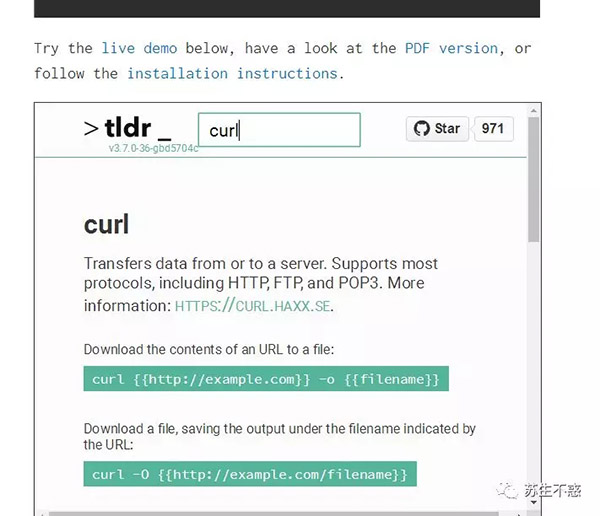
有了tldr,媽媽再也不用擔心我記不住命令行參數了,還有沒有比 tldr更強悍的男人呢,有,比如cheat https://github.com/cheat/cheat ,直接使用pip install cheat安裝。
cheat
看看 cheat 怎么用吧
- $ cheat cheat
- # To see example usage of a program:
- cheat <command>
- # To edit a cheatsheet
- cheat -e <command>
- # To list available cheatsheets
- cheat -l
- # To search available cheatsheets
- cheat -s <command>
- # To get the current `cheat' version
- cheat -v
試試 curl
- $ cheat curl
- # Download a single file
- curl http://path.to.the/file
- # Download a file and specify a new filename
- curl http://example.com/file.zip -o new_file.zip
- # Download multiple files
- curl -O URLOfFirstFile -O URLOfSecondFile
- # Download all sequentially numbered files (1-24)
- curl http://example.com/pic[1-24].jpg
- # Download a file and pass HTTP Authentication
- curl -u username:password URL
- # Download a file with a Proxy
- curl -x proxysever.server.com:PORT http://addressiwantto.access
- # Download a file from FTP
- curl -u username:password -O ftp://example.com/pub/file.zip
- # Get an FTP directory listing
- curl ftp://username:password@example.com
- # Resume a previously failed download
- curl -C - -o partial_file.zip http://example.com/file.zip
- # Fetch only the HTTP headers from a response
- curl -I http://example.com
- # Fetch your external IP and network info as JSON
- curl http://ifconfig.me/all/json
- # Limit the rate of a download
- curl --limit-rate 1000B -O http://path.to.the/file
- # Get your global IP
- curl httpbin.org/ip
- # Get only the HTTP status code
- curl -o /dev/null -w '%{http_code}
- ' -s -I URL
比tldr更詳細,如果你也不想安裝可以直接使用curl
cht.sh
- [root@VM_0_14_centos ~]# curl cht.sh/curl
- # Download a single file
- curl http://path.to.the/file
- # Download a file and specify a new filename
- curl http://example.com/file.zip -o new_file.zip
- # Download multiple files
- curl -O URLOfFirstFile -O URLOfSecondFile
- # Download all sequentially numbered files (1-24)
- curl http://example.com/pic[1-24].jpg
- # Download a file and follow redirects
- curl -L http://example.com/file
- # Download a file and pass HTTP Authentication
- curl -u username:password URL
- # Download a file with a Proxy
- curl -x proxysever.server.com:PORT http://addressiwantto.access
- # Download a file from FTP
- curl -u username:password -O ftp://example.com/pub/file.zip
- # Get an FTP directory listing
- curl ftp://username:password@example.com
- # Resume a previously failed download
- curl -C - -o partial_file.zip http://example.com/file.zip
- # Fetch only the HTTP headers from a response
- curl -I http://example.com
- # Fetch your external IP and network info as JSON
- curl http://ifconfig.me/all/json
- # Limit the rate of a download
- curl --limit-rate 1000B -O http://path.to.the/file
- # POST to a form
- curl -F "name=user" -F "password=test" http://example.com
- # POST JSON Data
- curl -H "Content-Type: application/json" -X POST -d '{"user":"bob","pass":"123"}' http://example.com
- # POST data from the standard in / share data on sprunge.us
- curl -F 'sprunge=<-' sprunge.us
看看Python的requests怎么用
- [root@VM_0_14_centos ~]# curl cheat.sh/python/requests
- # python-requests: Limit Number of Redirects Followed
- #
- # You have to create Session (http://www.python-
- # requests.org/en/latest/api/requests.Session) object and set
- # max_redirects variable to 3
- session = requests.Session()
- session.max_redirects = 3
- session.get(url)
- # TooManyRedirects exception will be raised if a requests exceeds
- # maximum number of redirects.
- #
- # Related github issue discussing why you can not set max_redirects per
- # request https://github.com/kennethreitz/requests/issues/1300
- #
- # [Alik] [so/q/31552627] [cc by-sa 3.0]
它也有網頁版 http://cht.sh/curl
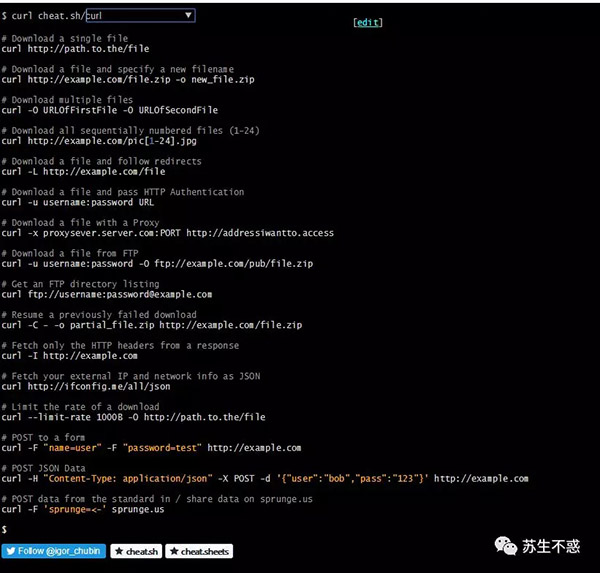
有了tldr和cheat,再也不用記那么多命令行參數了。
win下執行命令行的工具我常用cmder,如果你用的win10,可以嘗試下微軟最新發布的Terminal https://github.com/microsoft/Terminal