一篇文章教你搞懂日志采集利器Filebeat

本文使用的Filebeat是7.7.0的版本,文章將從如下幾個方面說明:
Filebeat是什么,可以用來干嘛
Filebeat的原理是怎樣的,怎么構成的
Filebeat應該怎么玩
Filebeat是什么
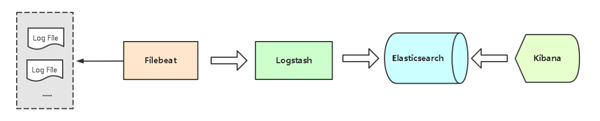
Filebeat和Beats的關系
首先Filebeat是Beats中的一員。
Beats在是一個輕量級日志采集器,其實Beats家族有6個成員,早期的ELK架構中使用Logstash收集、解析日志,但是Logstash對內存、CPU、io等資源消耗比較高。相比Logstash,Beats所占系統的CPU和內存幾乎可以忽略不計。
目前Beats包含六種工具:
- Packetbeat:網絡數據(收集網絡流量數據)
- Metricbeat:指標(收集系統、進程和文件系統級別的CPU和內存使用情況等數據)
- Filebeat:日志文件(收集文件數據)
- Winlogbeat:Windows事件日志(收集Windows事件日志數據)
- Auditbeat:審計數據(收集審計日志)
- Heartbeat:運行時間監控(收集系統運行時的數據)
Filebeat是什么
Filebeat是用于轉發和集中日志數據的輕量級傳送工具。Filebeat監視您指定的日志文件或位置,收集日志事件,并將它們轉發到Elasticsearch或 Logstash進行索引。
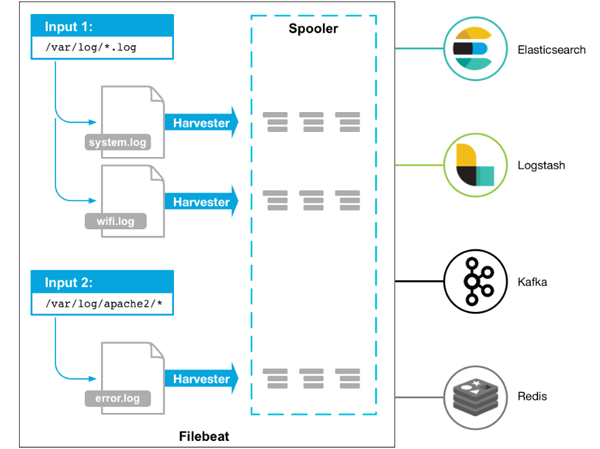
Filebeat的工作方式如下:啟動Filebeat時,它將啟動一個或多個輸入,這些輸入將在為日志數據指定的位置中查找。對于Filebeat所找到的每個日志,Filebeat都會啟動收集器。每個收集器都讀取單個日志以獲取新內容,并將新日志數據發送到libbeat,libbeat將聚集事件,并將聚集的數據發送到為Filebeat配置的輸出。
工作的流程圖如下:
Filebeat和Logstash的關系
因為Logstash是JVM跑的,資源消耗比較大,所以后來作者又用Golang寫了一個功能較少但是資源消耗也小的輕量級的logstash-forwarder。不過作者只是一個人,加入http://elastic.co公司以后,因為ES公司本身還收購了另一個開源項目Packetbeat,而這個項目專門就是用Golang的,有整個團隊,所以ES公司干脆把logstash-forwarder的開發工作也合并到同一個Golang團隊來搞,于是新的項目就叫Filebeat了。
Filebeat原理是什么
Filebeat的構成
Filebeat結構:由兩個組件構成,分別是inputs(輸入)和harvesters(收集器),這些組件一起工作來跟蹤文件并將事件數據發送到您指定的輸出,harvester負責讀取單個文件的內容。harvester逐行讀取每個文件,并將內容發送到輸出。為每個文件啟動一個harvester。harvester負責打開和關閉文件,這意味著文件描述符在harvester運行時保持打開狀態。如果在收集文件時刪除或重命名文件,Filebeat將繼續讀取該文件。這樣做的副作用是,磁盤上的空間一直保留到harvester關閉。默認情況下,Filebeat保持文件打開,直到達到close_inactive。
關閉harvester可以會產生的結果:
- 文件處理程序關閉,如果harvester仍在讀取文件時被刪除,則釋放底層資源。
- 只有在scan_frequency結束之后,才會再次啟動文件的收集。
- 如果該文件在harvester關閉時被移動或刪除,該文件的收集將不會繼續。
一個input負責管理harvesters和尋找所有來源讀取。如果input類型是log,則input將查找驅動器上與定義的路徑匹配的所有文件,并為每個文件啟動一個harvester。每個input在它自己的Go進程中運行,Filebeat當前支持多種輸入類型。每個輸入類型可以定義多次。日志輸入檢查每個文件,以查看是否需要啟動harvester、是否已經在運行harvester或是否可以忽略該文件。
Filebeat如何保存文件的狀態
Filebeat保留每個文件的狀態,并經常將狀態刷新到磁盤中的注冊表文件中。該狀態用于記住harvester讀取的最后一個偏移量,并確保發送所有日志行。如果無法訪問輸出(如Elasticsearch或Logstash),Filebeat將跟蹤最后發送的行,并在輸出再次可用時繼續讀取文件。當Filebeat運行時,每個輸入的狀態信息也保存在內存中。當Filebeat重新啟動時,來自注冊表文件的數據用于重建狀態,Filebeat在最后一個已知位置繼續每個harvester。對于每個輸入,Filebeat都會保留它找到的每個文件的狀態。由于文件可以重命名或移動,文件名和路徑不足以標識文件。對于每個文件,Filebeat存儲唯一的標識符,以檢測文件是否以前被捕獲。
Filebeat何如保證至少一次數據消費
Filebeat保證事件將至少傳遞到配置的輸出一次,并且不會丟失數據。是因為它將每個事件的傳遞狀態存儲在注冊表文件中。在已定義的輸出被阻止且未確認所有事件的情況下,Filebeat將繼續嘗試發送事件,直到輸出確認已接收到事件為止。如果Filebeat在發送事件的過程中關閉,它不會等待輸出確認所有事件后再關閉。當Filebeat重新啟動時,將再次將Filebeat關閉前未確認的所有事件發送到輸出。這樣可以確保每個事件至少發送一次,但最終可能會有重復的事件發送到輸出。通過設置shutdown_timeout選項,可以將Filebeat配置為在關機前等待特定時間。
Filebeat怎么玩
壓縮包方式安裝
本文采用壓縮包的方式安裝,Linux版本,filebeat-7.7.0-linux-x86_64.tar.gz。
- curl-L-Ohttps://artifacts.elastic.co/downloads/beats/filebeat/filebeat-7.7.0-linux-x86_64.tar.gz
- tar -xzvf filebeat-7.7.0-linux-x86_64.tar.gz
配置示例文件:filebeat.reference.yml(包含所有未過時的配置項)
配置文件:filebeat.yml
基本命令
詳情見官網:https://www.elastic.co/guide/en/beats/filebeat/current/command-line-options.html
- export #導出
- run #執行(默認執行)
- test #測試配置
- keystore #秘鑰存儲
- modules #模塊配置管理
- setup #設置初始環境
例如:./filebeat test config #用來測試配置文件是否正確
輸入輸出
支持的輸入組件:
Multilinemessages,Azureeventhub,CloudFoundry,Container,Docker,GooglePub/Sub,HTTPJSON,Kafka,Log,MQTT,NetFlow,Office 365 Management Activity API,Redis,s3,Stdin,Syslog,TCP,UDP(最常用的就是Log)
支持的輸出組件:
Elasticsearch,Logstash,Kafka,Redis,File,Console,ElasticCloud,Changetheoutputcodec(最常用的就是Elasticsearch,Logstash)
keystore的使用
keystore主要是防止敏感信息被泄露,比如密碼等,像ES的密碼,這里可以生成一個key為ES_PWD,值為ES的password的一個對應關系,在使用ES的密碼的時候就可以使用${ES_PWD}使用。
- 創建一個存儲密碼的keystore:filebeat keystore create
- 然后往其中添加鍵值對,例如:filebeatk eystore add ES_PWD
- 使用覆蓋原來鍵的值:filebeat key store add ES_PWD–force
- 刪除鍵值對:filebeat key store remove ES_PWD
- 查看已有的鍵值對:filebeat key store list
例如:后期就可以通過${ES_PWD}使用其值,例如:
- output.elasticsearch.password:"${ES_PWD}"
filebeat.yml配置(Log輸入類型為例)
詳情見官網:https://www.elastic.co/guide/en/beats/filebeat/current/filebeat-input-log.html
- type: log #input類型為log
- enable: true #表示是該log類型配置生效
- paths: #指定要監控的日志,目前按照Go語言的glob函數處理。沒有對配置目錄做遞歸處理,比如配置的如果是:
- - /var/log/* /*.log #則只會去/var/log目錄的所有子目錄中尋找以".log"結尾的文件,而不會尋找/var/log目錄下以".log"結尾的文件。
- recursive_glob.enabled: #啟用全局遞歸模式,例如/foo/**包括/foo, /foo/*, /foo/*/*
- encoding:#指定被監控的文件的編碼類型,使用plain和utf-8都是可以處理中文日志的
- exclude_lines: ['^DBG'] #不包含匹配正則的行
- include_lines: ['^ERR', '^WARN'] #包含匹配正則的行
- harvester_buffer_size: 16384 #每個harvester在獲取文件時使用的緩沖區的字節大小
- max_bytes: 10485760 #單個日志消息可以擁有的最大字節數。max_bytes之后的所有字節都被丟棄而不發送。默認值為10MB (10485760)
- exclude_files: ['\.gz$'] #用于匹配希望Filebeat忽略的文件的正則表達式列表
- ingore_older: 0 #默認為0,表示禁用,可以配置2h,2m等,注意ignore_older必須大于close_inactive的值.表示忽略超過設置值未更新的
- 文件或者文件從來沒有被harvester收集
- close_* #close_ *配置選項用于在特定標準或時間之后關閉harvester。 關閉harvester意味著關閉文件處理程序。 如果在harvester關閉
- 后文件被更新,則在scan_frequency過后,文件將被重新拾取。 但是,如果在harvester關閉時移動或刪除文件,Filebeat將無法再次接收文件
- ,并且harvester未讀取的任何數據都將丟失。
- close_inactive #啟動選項時,如果在制定時間沒有被讀取,將關閉文件句柄
- 讀取的最后一條日志定義為下一次讀取的起始點,而不是基于文件的修改時間
- 如果關閉的文件發生變化,一個新的harverster將在scan_frequency運行后被啟動
- 建議至少設置一個大于讀取日志頻率的值,配置多個prospector來實現針對不同更新速度的日志文件
- 使用內部時間戳機制,來反映記錄日志的讀取,每次讀取到最后一行日志時開始倒計時使用2h 5m 來表示
- close_rename #當選項啟動,如果文件被重命名和移動,filebeat關閉文件的處理讀取
- close_removed #當選項啟動,文件被刪除時,filebeat關閉文件的處理讀取這個選項啟動后,必須啟動clean_removed
- close_eof #適合只寫一次日志的文件,然后filebeat關閉文件的處理讀取
- close_timeout #當選項啟動時,filebeat會給每個harvester設置預定義時間,不管這個文件是否被讀取,達到設定時間后,將被關閉
- close_timeout 不能等于ignore_older,會導致文件更新時,不會被讀取如果output一直沒有輸出日志事件,這個timeout是不會被啟動的,
- 至少要要有一個事件發送,然后haverter將被關閉
- 設置0 表示不啟動
- clean_inactived #從注冊表文件中刪除先前收獲的文件的狀態
- 設置必須大于ignore_older+scan_frequency,以確保在文件仍在收集時沒有刪除任何狀態
- 配置選項有助于減小注冊表文件的大小,特別是如果每天都生成大量的新文件
- 此配置選項也可用于防止在Linux上重用inode的Filebeat問題
- clean_removed #啟動選項后,如果文件在磁盤上找不到,將從注冊表中清除filebeat
- 如果關閉close removed 必須關閉clean removed
- scan_frequency #prospector檢查指定用于收獲的路徑中的新文件的頻率,默認10s
- tail_files:#如果設置為true,Filebeat從文件尾開始監控文件新增內容,把新增的每一行文件作為一個事件依次發送,
- 而不是從文件開始處重新發送所有內容。
- symlinks:#符號鏈接選項允許Filebeat除常規文件外,可以收集符號鏈接。收集符號鏈接時,即使報告了符號鏈接的路徑,
- Filebeat也會打開并讀取原始文件。
- backoff: #backoff選項指定Filebeat如何積極地抓取新文件進行更新。默認1s,backoff選項定義Filebeat在達到EOF之后
- 再次檢查文件之間等待的時間。
- max_backoff: #在達到EOF之后再次檢查文件之前Filebeat等待的最長時間
- backoff_factor: #指定backoff嘗試等待時間幾次,默認是2
- harvester_limit:#harvester_limit選項限制一個prospector并行啟動的harvester數量,直接影響文件打開數
- tags #列表中添加標簽,用過過濾,例如:tags: ["json"]
- fields #可選字段,選擇額外的字段進行輸出可以是標量值,元組,字典等嵌套類型
- 默認在sub-dictionary位置
- filebeat.inputs:
- fields:
- app_id: query_engine_12
- fields_under_root #如果值為ture,那么fields存儲在輸出文檔的頂級位置
- multiline.pattern #必須匹配的regexp模式
- multiline.negate #定義上面的模式匹配條件的動作是 否定的,默認是false
- 假如模式匹配條件'^b',默認是false模式,表示講按照模式匹配進行匹配 將不是以b開頭的日志行進行合并
- 如果是true,表示將不以b開頭的日志行進行合并
- multiline.match # 指定Filebeat如何將匹配行組合成事件,在之前或者之后,取決于上面所指定的negate
- multiline.max_lines #可以組合成一個事件的最大行數,超過將丟棄,默認500
- multiline.timeout #定義超時時間,如果開始一個新的事件在超時時間內沒有發現匹配,也將發送日志,默認是5s
- max_procs #設置可以同時執行的最大CPU數。默認值為系統中可用的邏輯CPU的數量。
- name #為該filebeat指定名字,默認為主機的hostname
實例一:Logstash作為輸出
filebeat.yml配置:
- #=========================== Filebeat inputs =============================
- filebeat.inputs:
- # Each - is an input. Most options can be set at the input level, so
- # you can use different inputs for various configurations.
- # Below are the input specific configurations.
- - type: log
- # Change to true to enable this input configuration.
- enabled: true
- # Paths that should be crawled and fetched. Glob based paths.
- paths: #配置多個日志路徑
- -/var/logs/es_aaa_index_search_slowlog.log
- -/var/logs/es_bbb_index_search_slowlog.log
- -/var/logs/es_ccc_index_search_slowlog.log
- -/var/logs/es_ddd_index_search_slowlog.log
- #- c:\programdata\elasticsearch\logs\*
- # Exclude lines. A list of regular expressions to match. It drops the lines that are
- # matching any regular expression from the list.
- #exclude_lines: ['^DBG']
- # Include lines. A list of regular expressions to match. It exports the lines that are
- # matching any regular expression from the list.
- #include_lines: ['^ERR', '^WARN']
- # Exclude files. A list of regular expressions to match. Filebeat drops the files that
- # are matching any regular expression from the list. By default, no files are dropped.
- #exclude_files: ['.gz$']
- # Optional additional fields. These fields can be freely picked
- # to add additional information to the crawled log files for filtering
- #fields:
- # level: debug
- # review: 1
- ### Multiline options
- # Multiline can be used for log messages spanning multiple lines. This is common
- # for Java Stack Traces or C-Line Continuation
- # The regexp Pattern that has to be matched. The example pattern matches all lines starting with [
- #multiline.pattern: ^\[
- # Defines if the pattern set under pattern should be negated or not. Default is false.
- #multiline.negate: false
- # Match can be set to "after" or "before". It is used to define if lines should be append to a pattern
- # that was (not) matched before or after or as long as a pattern is not matched based on negate.
- # Note: After is the equivalent to previous and before is the equivalent to to next in Logstash
- #multiline.match: after
- #================================ Outputs =====================================
- #----------------------------- Logstash output --------------------------------
- output.logstash:
- # The Logstash hosts #配多個logstash使用負載均衡機制
- hosts: ["192.168.110.130:5044","192.168.110.131:5044","192.168.110.132:5044","192.168.110.133:5044"]
- loadbalance: true #使用了負載均衡
- # Optional SSL. By default is off.
- # List of root certificates for HTTPS server verifications
- #ssl.certificate_authorities: ["/etc/pki/root/ca.pem"]
- # Certificate for SSL client authentication
- #ssl.certificate: "/etc/pki/client/cert.pem"
- # Client Certificate Key
- #ssl.key: "/etc/pki/client/cert.key"
./filebeat -e #啟動filebeat
Logstash的配置:
- input {
- beats {
- port => 5044
- }
- }
- output {
- elasticsearch {
- hosts => ["http://192.168.110.130:9200"] #這里可以配置多個
- index => "query-%{yyyyMMdd}"
- }
- }
實例二:Elasticsearch作為輸出
filebeat.yml的配置:
- ###################### Filebeat Configuration Example #########################
- # This file is an example configuration file highlighting only the most common
- # options. The filebeat.reference.yml file from the same directory contains all the
- # supported options with more comments. You can use it as a reference.
- #
- # You can find the full configuration reference here:
- # https://www.elastic.co/guide/en/beats/filebeat/index.html
- # For more available modules and options, please see the filebeat.reference.yml sample
- # configuration file.
- #=========================== Filebeat inputs =============================
- filebeat.inputs:
- # Each - is an input. Most options can be set at the input level, so
- # you can use different inputs for various configurations.
- # Below are the input specific configurations.
- - type: log
- # Change to true to enable this input configuration.
- enabled: true
- # Paths that should be crawled and fetched. Glob based paths.
- paths:
- -/var/logs/es_aaa_index_search_slowlog.log
- -/var/logs/es_bbb_index_search_slowlog.log
- -/var/logs/es_ccc_index_search_slowlog.log
- -/var/logs/es_dddd_index_search_slowlog.log
- #- c:\programdata\elasticsearch\logs\*
- # Exclude lines. A list of regular expressions to match. It drops the lines that are
- # matching any regular expression from the list.
- #exclude_lines: ['^DBG']
- # Include lines. A list of regular expressions to match. It exports the lines that are
- # matching any regular expression from the list.
- #include_lines: ['^ERR', '^WARN']
- # Exclude files. A list of regular expressions to match. Filebeat drops the files that
- # are matching any regular expression from the list. By default, no files are dropped.
- #exclude_files: ['.gz$']
- # Optional additional fields. These fields can be freely picked
- # to add additional information to the crawled log files for filtering
- #fields:
- # level: debug
- # review: 1
- ### Multiline options
- # Multiline can be used for log messages spanning multiple lines. This is common
- # for Java Stack Traces or C-Line Continuation
- # The regexp Pattern that has to be matched. The example pattern matches all lines starting with [
- #multiline.pattern: ^\[
- # Defines if the pattern set under pattern should be negated or not. Default is false.
- #multiline.negate: false
- # Match can be set to "after" or "before". It is used to define if lines should be append to a pattern
- # that was (not) matched before or after or as long as a pattern is not matched based on negate.
- # Note: After is the equivalent to previous and before is the equivalent to to next in Logstash
- #multiline.match: after
- #============================= Filebeat modules ===============================
- filebeat.config.modules:
- # Glob pattern for configuration loading
- path: ${path.config}/modules.d/*.yml
- # Set to true to enable config reloading
- reload.enabled: false
- # Period on which files under path should be checked for changes
- #reload.period: 10s
- #==================== Elasticsearch template setting ==========================
- #================================ General =====================================
- # The name of the shipper that publishes the network data. It can be used to group
- # all the transactions sent by a single shipper in the web interface.
- name: filebeat222
- # The tags of the shipper are included in their own field with each
- # transaction published.
- #tags: ["service-X", "web-tier"]
- # Optional fields that you can specify to add additional information to the
- # output.
- #fields:
- # env: staging
- #cloud.auth:
- #================================ Outputs =====================================
- #-------------------------- Elasticsearch output ------------------------------
- output.elasticsearch:
- # Array of hosts to connect to.
- hosts: ["192.168.110.130:9200","92.168.110.131:9200"]
- # Protocol - either `http` (default) or `https`.
- #protocol: "https"
- # Authentication credentials - either API key or username/password.
- #api_key: "id:api_key"
- username: "elastic"
- password: "${ES_PWD}" #通過keystore設置密碼
./filebeat -e #啟動Filebeat
查看Elasticsearch集群,有一個默認的索引名字filebeat-%{[beat.version]}-%{+yyyy.MM.dd}

Filebeat模塊
官網:https://www.elastic.co/guide/en/beats/filebeat/current/filebeat-modules.html
這里我使用Elasticsearch模式來解析ES的慢日志查詢,操作步驟如下,其他的模塊操作也一樣:
前提:安裝好Elasticsearch和Kibana兩個軟件,然后使用Filebeat。
具體的操作官網有:https://www.elastic.co/guide/en/beats/filebeat/current/filebeat-modules-quickstart.html
第一步,配置filebeat.yml文件:
- #============================== Kibana =====================================
- # Starting with Beats version 6.0.0, the dashboards are loaded via the Kibana API.
- # This requires a Kibana endpoint configuration.
- setup.kibana:
- # Kibana Host
- # Scheme and port can be left out and will be set to the default (http and 5601)
- # In case you specify and additional path, the scheme is required: http://localhost:5601/path
- # IPv6 addresses should always be defined as: https://[2001:db8::1]:5601
- host: "192.168.110.130:5601" #指定kibana
- username: "elastic" #用戶
- password: "${ES_PWD}" #密碼,這里使用了keystore,防止明文密碼
- # Kibana Space ID
- # ID of the Kibana Space into which the dashboards should be loaded. By default,
- # the Default Space will be used.
- #space.id:
- #================================ Outputs =====================================
- # Configure what output to use when sending the data collected by the beat.
- #-------------------------- Elasticsearch output ------------------------------
- output.elasticsearch:
- # Array of hosts to connect to.
- hosts: ["192.168.110.130:9200","192.168.110.131:9200"]
- # Protocol - either `http` (default) or `https`.
- #protocol: "https"
- # Authentication credentials - either API key or username/password.
- #api_key: "id:api_key"
- username: "elastic" #es的用戶
- password: "${ES_PWD}" # es的密碼
- #這里不能指定index,因為我沒有配置模板,會自動生成一個名為filebeat-%{[beat.version]}-%{+yyyy.MM.dd}的索引
第二步,配置Elasticsearch的慢日志路徑:
- cd filebeat-7.7.0-linux-x86_64/modules.d
vim elasticsearch.yml:

第三步,生效ES模塊:
- ./filebeat modules elasticsearch
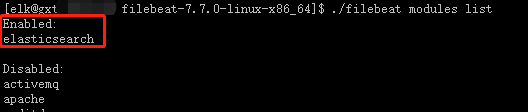
查看生效的模塊:
- ./filebeat modules list
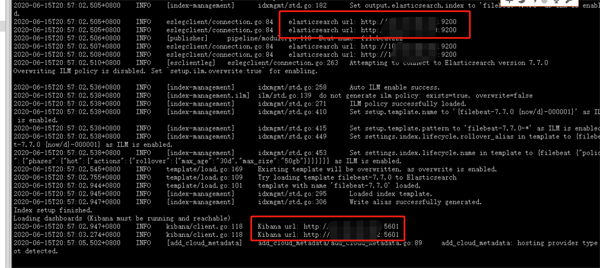
第四步,初始化環境:
- ./filebeat setup -e
第五步,啟動Filebeat:
- ./filebeat -e
查看Elasticsearch集群,如下圖所示,把慢日志查詢的日志都自動解析出來了:

到這里,Elasticsearch這個module就實驗成功了。