MySQL innodb引擎?zhèn)浞莨ぞ遆traBackup之一(Install)
Xtrabackup是一個對InnoDB做數(shù)據(jù)備份的工具,支持在線熱備份(備份時不影響數(shù)據(jù)讀寫),是商業(yè)備份工具InnoDB Hotbackup的一個很好的替代品。
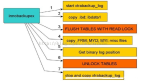
Xtrabackup有兩個主要的工具:xtrabackup、innobackupex
(1)xtrabackup只能備份InnoDB和XtraDB兩種數(shù)據(jù)表,而不能備份MyISAM數(shù)據(jù)表
(2)innobackupex-1.5.1則封裝了xtrabackup,是一個腳本封裝,所以能同時備份處理innodb和myisam,但在處理myisam時需要加一個讀鎖
安裝XtraBackup,首先要安裝MySQL
1、查看MySQL版本
[root@rh64 ~]# service mysql start
Starting MySQL (Percona Server)...[ OK ]
[root@rh64 ~]# mysql -u root -p
Enter password:
Welcome to the MySQL monitor. Commands end with ; or \g.
Your MySQL connection id is 1
Server version: 5.6.25-73.1 Percona Server (GPL), Release 73.1, Revision 07b797f
Copyright (c) 2009-2015 Percona LLC and/or its affiliates
Copyright (c) 2000, 2015, Oracle and/or its affiliates. All rights reserved.
Oracle is a registered trademark of Oracle Corporation and/or its
affiliates. Other names may be trademarks of their respective
owners.
Type 'help;' or '\h' for help. Type '\c' to clear the current input statement.
mysql>
2、安裝配置
在/etc/my.cnf文件要配置數(shù)據(jù)所存儲的目錄
[root@rh64 XtraBackup]# cat /etc/my.cnf |grep datadir
datadir=/var/lib/mysql
3、下載安裝
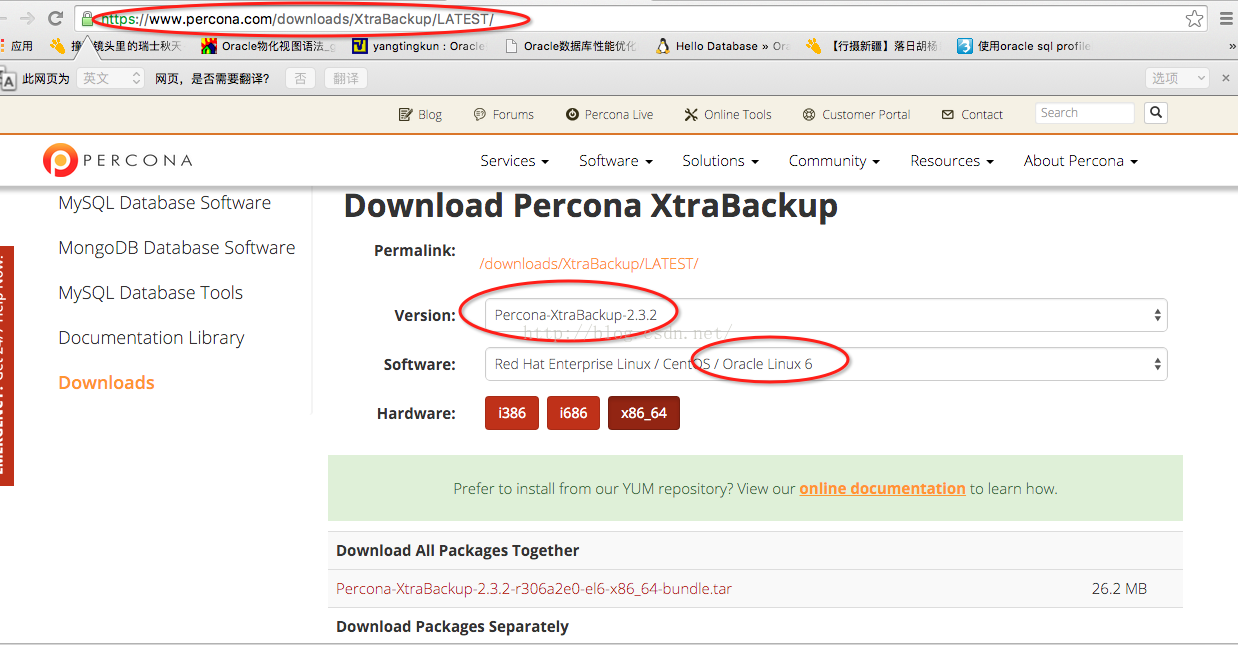
安裝:
[root@rh64 XtraBackup]# ls -l
total 26808
-rw-r----- 1 mysql mysql 5664452 Oct 27 10:27 percona-xtrabackup-2.3.2-1.el6.x86_64.rpm
-rw-r----- 1 mysql mysql 20807976 Oct 27 10:27 percona-xtrabackup-debuginfo-2.3.2-1.el6.x86_64.rpm
-rw-r----- 1 mysql mysql 971264 Oct 27 10:27 percona-xtrabackup-test-2.3.2-1.el6.x86_64.rpm
[root@rh64 XtraBackup]# rpm -ivh percona-xtrabackup-2.3.2-1.el6.x86_64.rpm
warning: percona-xtrabackup-2.3.2-1.el6.x86_64.rpm: Header V4 DSA/SHA1 Signature, key ID cd2efd2a: NOKEY
error: Failed dependencies:
libev.so.4()(64bit) is needed by percona-xtrabackup-2.3.2-1.el6.x86_64
----安裝出錯,要求需有l(wèi)ibev.so庫支持
下載libev安裝包:
[root@rh64 libev-4.15]# tar zxvf libev-4.15.tar.gz
安裝libev:
[root@rh64 libev-4.15]# ./configure
checking for a BSD-compatible install... /usr/bin/install -c
checking whether build environment is sane... yes
checking for a thread-safe mkdir -p... /bin/mkdir -p
checking for gawk... gawk
checking whether make sets $(MAKE)... yes
checking whether to enable maintainer-specific portions of Makefiles... no
checking for gcc... gcc
checking whether the C compiler works... yes
checking for C compiler default output file name... a.out
checking for suffix of executables...
checking whether we are cross compiling... no
checking for suffix of object files... o
checking whether we are using the GNU C compiler... yes
checking whether gcc accepts -g... yes
checking for gcc option to accept ISO C89... none needed
checking for style of include used by make... GNU
checking dependency style of gcc... gcc3
checking build system type... x86_64-unknown-linux-gnu
checking host system type... x86_64-unknown-linux-gnu
checking how to print strings... printf
checking for a sed that does not truncate output... /bin/sed
checking for grep that handles long lines and -e... /bin/grep
checking for egrep... /bin/grep -E
checking for fgrep... /bin/grep -F
checking for ld used by gcc... /usr/bin/ld
checking if the linker (/usr/bin/ld) is GNU ld... yes
checking for BSD- or MS-compatible name lister (nm)... /usr/bin/nm -B
checking the name lister (/usr/bin/nm -B) interface... BSD nm
checking whether ln -s works... yes
checking the maximum length of command line arguments... 1966080
checking whether the shell understands some XSI constructs... yes
checking whether the shell understands "+="... yes
checking how to convert x86_64-unknown-linux-gnu file names to x86_64-unknown-linux-gnu format... func_convert_file_noop
checking how to convert x86_64-unknown-linux-gnu file names to toolchain format... func_convert_file_noop
checking for /usr/bin/ld option to reload object files... -r
checking for objdump... objdump
checking how to recognize dependent libraries... pass_all
checking for dlltool... no
checking how to associate runtime and link libraries... printf %s\n
checking for ar... ar
checking for archiver @FILE support... @
......
[root@rh64 libev-4.15]# make
make all-am
make[1]: Entering directory `/home/mysql/libev-4.15'
/bin/sh ./libtool --tag=CC --mode=compile gcc -DHAVE_CONFIG_H -I. -g -O3 -MT ev.lo -MD -MP -MF .deps/ev.Tpo -c -o ev.lo ev.c
libtool: compile: gcc -DHAVE_CONFIG_H -I. -g -O3 -MT ev.lo -MD -MP -MF .deps/ev.Tpo -c ev.c -fPIC -DPIC -o .libs/ev.o
ev.c:1531: warning: 'ev_default_loop_ptr' initialized and declared 'extern'
libtool: compile: gcc -DHAVE_CONFIG_H -I. -g -O3 -MT ev.lo -MD -MP -MF .deps/ev.Tpo -c ev.c -o ev.o >/dev/null 2>&1
mv -f .deps/ev.Tpo .deps/ev.Plo
/bin/sh ./libtool --tag=CC --mode=compile gcc -DHAVE_CONFIG_H -I. -g -O3 -MT event.lo -MD -MP -MF .deps/event.Tpo -c -o event.lo event.c
libtool: compile: gcc -DHAVE_CONFIG_H -I. -g -O3 -MT event.lo -MD -MP -MF .deps/event.Tpo -c event.c -fPIC -DPIC -o .libs/event.o
libtool: compile: gcc -DHAVE_CONFIG_H -I. -g -O3 -MT event.lo -MD -MP -MF .deps/event.Tpo -c event.c -o event.o >/dev/null 2>&1
mv -f .deps/event.Tpo .deps/event.Plo
/bin/sh ./libtool --tag=CC --mode=link gcc -g -O3 -version-info 4:0:0 -o libev.la -rpath /usr/local/lib ev.lo event.lo -lm
libtool: link: gcc -shared -fPIC -DPIC .libs/ev.o .libs/event.o -lm -O3 -Wl,-soname -Wl,libev.so.4 -o .libs/libev.so.4.0.0
libtool: link: (cd ".libs" && rm -f "libev.so.4" && ln -s "libev.so.4.0.0" "libev.so.4")
libtool: link: (cd ".libs" && rm -f "libev.so" && ln -s "libev.so.4.0.0" "libev.so")
libtool: link: ar cru .libs/libev.a ev.o event.o
libtool: link: ranlib .libs/libev.a
libtool: link: ( cd ".libs" && rm -f "libev.la" && ln -s "../libev.la" "libev.la" )
make[1]: Leaving directory `/home/mysql/libev-4.15'
[root@rh64 libev-4.15]# make install
make[1]: Entering directory `/home/mysql/libev-4.15'
/bin/mkdir -p '/usr/local/lib'
/bin/sh ./libtool --mode=install /usr/bin/install -c libev.la '/usr/local/lib'
libtool: install: /usr/bin/install -c .libs/libev.so.4.0.0 /usr/local/lib/libev.so.4.0.0
libtool: install: (cd /usr/local/lib && { ln -s -f libev.so.4.0.0 libev.so.4 || { rm -f libev.so.4 && ln -s libev.so.4.0.0 libev.so.4; }; })
libtool: install: (cd /usr/local/lib && { ln -s -f libev.so.4.0.0 libev.so || { rm -f libev.so && ln -s libev.so.4.0.0 libev.so; }; })
libtool: install: /usr/bin/install -c .libs/libev.lai /usr/local/lib/libev.la
libtool: install: /usr/bin/install -c .libs/libev.a /usr/local/lib/libev.a
libtool: install: chmod 644 /usr/local/lib/libev.a
libtool: install: ranlib /usr/local/lib/libev.a
libtool: finish: PATH="/usr/lib64/qt-3.3/bin:/usr/local/sbin:/usr/local/bin:/sbin:/bin:/usr/sbin:/usr/bin:/root/bin:/sbin" ldconfig -n /usr/local/lib
----------------------------------------------------------------------
Libraries have been installed in:
/usr/local/lib
If you ever happen to want to link against installed libraries
in a given directory, LIBDIR, you must either use libtool, and
specify the full pathname of the library, or use the `-LLIBDIR'
flag during linking and do at least one of the following:
- add LIBDIR to the `LD_LIBRARY_PATH' environment variable
during execution
- add LIBDIR to the `LD_RUN_PATH' environment variable
during linking
- use the `-Wl,-rpath -Wl,LIBDIR' linker flag
- have your system administrator add LIBDIR to `/etc/ld.so.conf'
See any operating system documentation about shared libraries for
more information, such as the ld(1) and ld.so(8) manual pages.
----------------------------------------------------------------------
/bin/mkdir -p '/usr/local/include'
/usr/bin/install -c -m 644 ev.h ev++.h event.h '/usr/local/include'
/bin/mkdir -p '/usr/local/share/man/man3'
/usr/bin/install -c -m 644 ev.3 '/usr/local/share/man/man3'
make[1]: Leaving directory `/home/mysql/libev-4.15'
查看libev安裝信息:
[root@rh64 libev-4.15]# find / -name 'libev.so*'
/home/mysql/libev-4.15/.libs/libev.so.4.0.0
/home/mysql/libev-4.15/.libs/libev.so
/home/mysql/libev-4.15/.libs/libev.so.4
/usr/local/lib/libev.so.4.0.0
/usr/local/lib/libev.so.4
/usr/local/lib/libev.so
配置lib訪問環(huán)境:
[root@rh64 XtraBackup]# cat /etc/profile
export LIBDIR=/usr/local/lib
export LD_LIBRARY_PATH=/usr/local/lib
export LD_RUN_PATH=/usr/local/lib
"/etc/profile" 82L, 1898C written
再次安裝:
[root@rh64 XtraBackup]# rpm -ivh percona-xtrabackup-2.3.2-1.el6.x86_64.rpm
warning: percona-xtrabackup-2.3.2-1.el6.x86_64.rpm: Header V4 DSA/SHA1 Signature, key ID cd2efd2a: NOKEY
error: Failed dependencies:
libev.so.4()(64bit) is needed by percona-xtrabackup-2.3.2-1.el6.x86_64
---仍然失敗!!!可能是libev的版本不對,應(yīng)該下載libev(64)
下載libev(64)并安裝:
http://rpmfind.net/linux/rpm2html/search.php?query=libev.so.4()(64bit)
[root@rh64 mysql]# rpm -ivh libev-4.04-2.el6.x86_64.rpm
warning: libev-4.04-2.el6.x86_64.rpm: Header V4 DSA/SHA1 Signature, key ID 66534c2b: NOKEY
Preparing... ########################################### [100%]
1:libev ########################################### [100%]
[root@rh64 mysql]# rpm -qa |grep libev
libevent-1.4.13-4.el6.x86_64
libevent-1.4.13-4.el6.i686
libev-4.04-2.el6.x86_64
[root@rh64 mysql]# rpm -ql libev
/usr/lib64/libev.so.4
/usr/lib64/libev.so.4.0.0
/usr/share/doc/libev-4.04
/usr/share/doc/libev-4.04/Changes
/usr/share/doc/libev-4.04/LICENSE
/usr/share/doc/libev-4.04/README
安裝xtrabackup:
[root@rh64 XtraBackup]# ls
percona-xtrabackup-2.3.2-1.el6.x86_64.rpm percona-xtrabackup-test-2.3.2-1.el6.x86_64.rpm
percona-xtrabackup-debuginfo-2.3.2-1.el6.x86_64.rpm
[root@rh64 XtraBackup]# rpm -ivh *
warning: percona-xtrabackup-2.3.2-1.el6.x86_64.rpm: Header V4 DSA/SHA1 Signature, key ID cd2efd2a: NOKEY
Preparing... ########################################### [100%]
1:percona-xtrabackup ########################################### [ 33%]
2:percona-xtrabackup-test########################################### [ 67%]
3:percona-xtrabackup-debu########################################### [100%]
----安裝成功!!!
[root@rh64 XtraBackup]# man innobackupex
INNOBACKUPEX(1) Percona XtraBackup INNOBACKUPEX(1)
NAME
innobackupex - innobackupex Documentation
The innobackupex tool is a Perl script that acts as a wrapper for the xtrabackup C program. It
is a patched version of the innobackup Perl script that Oracle distributes with the InnoDB Hot
Backup tool. It enables more functionality by integrating xtrabackup and other functions such as
file copying and streaming, and adds some convenience. It lets you perform point-in-time backups
of InnoDB / XtraDB tables together with the schema definitions, MyISAM tables, and other por-
tions of the server.
This manual section explains how to use innobackupex in detail.
PREREQUISITES
Connection and Privileges Needed
Percona XtraBackup needs to be able to connect to the database server and perform operations on
the server and the datadir when creating a backup, when preparing in some scenarios and when
restoring it. In order to do so, there are privileges and permission requirements on its execu-
tion that must be fulfilled.
Privileges refers to the operations that a system user is permitted to do in the database
server. They are set at the database server and only apply to users in the database server.
Permissions are those which permits a user to perform operations on the system, like reading,
writing or executing on a certain directory or start/stop a system service. They are set at a
system level and only apply to system users.
Whether xtrabackup or innobackupex is used, there are two actors involved: the user invoking the
program - a system user - and the user performing action in the database server - a database
user. Note that these are different users in different places, even tough they may have the same
username.
All the invocations of innobackupex and xtrabackup in this documentation assumes that the system
user has the appropriate permissions and you are providing the relevant options for connecting
the database server - besides the options for the action to be performed - and the database user
has adequate privileges.
Connecting to the server
The database user used to connect to the server and its password are specified by the --user and
--password option,
$ innobackupex --user=DBUSER --password=SECRET /path/to/backup/dir/
$ innobackupex --user=LUKE --password=US3TH3F0RC3 --stream=tar ./ | bzip2 -
$ xtrabackup --user=DVADER --password=14MY0URF4TH3R --backup --target-dir=/data/bkps/
----至此,XtraBackup安裝完成!!!